My experiences and learnings on Technology, Leadership, Domains, Life and on various topics as a reference!
What you can expect here, it could be something on Java, J2EE, Databases, or altogether on a newer Programming language, Software Engineering Best Practices, Software Architecture, SOA, REST, Web Services, Micro Services, APIs, Technical Architecture, Design, Programming, Cloud, Application Security, Artificial Intelligence, Machine Learning, Big data and Analytics, Integrations, Middleware, Continuous Delivery, DevOps, Cyber Security, Application Security, QA/QE, Automations, Emerging Technologies, B2B, B2C, ERP, SCM, PLM, FinTech, IoT, RegTech or any other domain, Tips & Traps, News, Books, Life experiences, Notes, latest trends and many more...
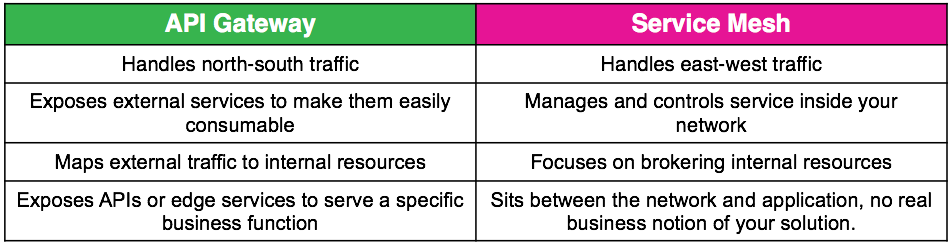
Service Mesh "How is it different from an API gateway?" It's a good question. The overlap between API gateway and service mesh patterns is significant. They can both handle service discovery, request routing, authentication, rate limiting, and monitoring, but there are differences in architectures and intentions. A service mesh's primary purpose is to manage internal service-to-service communication, while an API Gateway is primarily meant for external client-to-service communication.
Do You Need Both?
You may be wondering if you need both an API gateway and a service mesh. Today you probably do, but as service mesh evolves, we believe it will incorporate much of what you get from an API gateway today.
The main purpose of an API gateway is to accept traffic from outside your network and distribute it internally. The main purpose of a service mesh is to route and manage traffic within your network. A service mesh can work with an API gateway to efficiently accept external traffic then effectively route that traffic once it's in your network. The combination of these technologies can be a powerful way to ensure application uptime and resiliency while ensuring your applications are easily consumable.
In a deployment with an API gateway and a service mesh, incoming traffic from outside the cluster would first be routed through the API gateway, then into the mesh. The API gateway could handle authentication, edge routing and other edge functions, while the service mesh provides fine-grained observability of and control of your architecture.
The interesting thing to note is that service mesh technologies are quickly evolving and are starting to take on some of the functions of an API gateway. A great example is the introduction of the Istio v1alpha3 routing API which is available in Aspen Mesh 1.0. Prior to this, Istio had used Kubernetes ingress control which is pretty basic so it made sense to use an API gateway for better functionality. But, the increased functionality introduced by the v1alpha3 API has made it easier to manage large applications and to work with protocols other than HTTP, which was previously something an API gateway was needed to do effectively.
What The Future Holds
The v1alpha3 API provides a good example of how a service mesh is reducing the need for API gateway capabilities. As the cloud-native space evolves and more organizations move to using Docker and Kubernetes to manage their microservice architectures, it seems highly likely that service mesh and API gateway functionality will merge. In the next few years, we believe that standalone API gateways will be used less and less as much of their functionality will be absorbed by service mesh.
Here are the must-know top 10 design patterns for beginners synthesized from the Kubernetes Patterns book. Getting familiar with these patterns will help you understand foundational Kubernetes concepts, which in turn will help you in discussions and when designing Kubernetes-based applications.
There are many important concepts in Kubernetes, but these are the most important ones to start with:
Source: Kubernetes Patterns
To help you understand, the patterns are organized into a few categories below, inspired by the Gang of Four’s design patterns.
Foundational patterns
These patterns represent the principles and best practices that containerized applications must comply with in order to become good cloud-native citizens. Regardless of the application’s nature, you should aim to follow these guidelines. Adhering to these principles will help ensure that your applications are suitable for automation on Kubernetes.
Health Probe pattern
Health Probe dictates that every container should implement specific APIs to help the platform observe and manage the application in the healthiest way possible. To be fully automatable, a cloud-native application must be highly observable by allowing its state to be inferred so that Kubernetes can detect whether the application is up and ready to serve requests. These observations influence the life-cycle management of Pods and the way traffic is routed to the application.
Predictable Demands pattern
Predictable Demands explains why every container should declare its resource profile and stay confined to the indicated resource requirements. The foundation of successful application deployment, management, and coexistence on a shared cloud environment is dependent on identifying and declaring the application’s resource requirements and runtime dependencies. This pattern describes how you should declare application requirements, whether they are hard runtime dependencies or resource requirements. Declaring your requirements is essential for Kubernetes to find the right place for your application within the cluster.
Automated Placement patterns
Automated Placement explains how to influence workload distribution in a multi-node cluster. Placement is the core function of the Kubernetes scheduler for assigning new Pods to nodes satisfying container resource requests and honoring scheduling policies. This pattern describes the principles of Kubernetes’ scheduling algorithm and the way to influence the placement decisions from the outside.
Structural patterns
Having good cloud-native containers is the first step, but not enough. Reusing containers and combining them into Pods to achieve the desired outcome is the next step. The patterns in this category are focused on structuring and organizing containers in a Pod to satisfy different use cases. The forces that affect containers in Pods result in these patterns.
Init Container pattern
Init Container introduces a separate life cycle for initialization-related tasks and the main application containers. Init Containers enable separation of concerns by providing a separate life cycle for initialization-related tasks distinct from the main application containers. This pattern introduces a fundamental Kubernetes concept that is used in many other patterns when initialization logic is required.
Sidecar patterns
Sidecar describes how to extend and enhance the functionality of a pre-existing container without changing it. This pattern is one of the fundamental container patterns that allows single-purpose containers to cooperate closely together.
Behavioral patterns
These patterns describe the life-cycle guarantees of the Pods ensured by the managing platform. Depending on the type of workload, a Pod might run until completion as a batch job or be scheduled to run periodically. It might run as a daemon service or singleton. Picking the right life-cycle management primitive will help you run a Pod with the desired guarantees.
Batch Job patterns
Batch Job describes how to run an isolated, atomic unit of work until completion. This pattern is suited for managing isolated atomic units of work in a distributed environment.
Stateful Service patterns
Stateful Service describes how to create and manage distributed stateful applications with Kubernetes. Such applications require features such as persistent identity, networking, storage, and ordinality. The StatefulSet primitive provides these building blocks with strong guarantees ideal for the management of stateful applications.
Service Discovery pattern
Service Discovery explains how clients can access and discover the instances that are providing application services. For this purpose, Kubernetes provides multiple mechanisms, depending on whether the service consumers and producers are located on or off the cluster.
Higher-level patterns
The patterns in this category are more complex and represent higher-level application management patterns. Some of the patterns here (such as Controller) are timeless, and Kubernetes itself is built on top of them.
Controller pattern
Controller is a pattern that actively monitors and maintains a set of Kubernetes resources in a desired state. The heart of Kubernetes itself consists of a fleet of controllers that regularly watch and reconcile the current state of applications with the declared target state. This pattern describes how to leverage this core concept for extending the platform for our own applications.
Operator pattern
An Operator is a Controller that uses a CustomResourceDefinitions to encapsulate operational knowledge for a specific application in an algorithmic and automated form. The Operator pattern allows us to extend the Controller pattern for more flexibility and greater expressiveness. There are an increasing number of Operators for Kubernetes, and this pattern is turning into the major form of operating complex distributed systems.
Summary
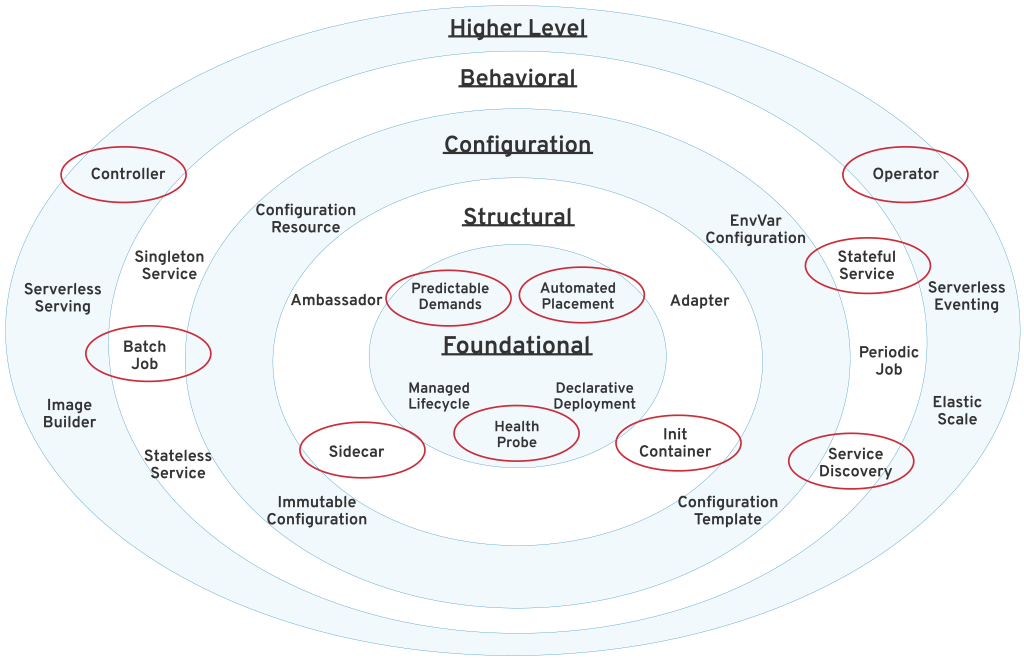
Today, Kubernetes is the most popular container orchestration platform. It is jointly developed and supported by all major software companies and offered as a service by all of the major cloud providers. Kubernetes supports both Linux and Windows systems, plus all major programming languages. This platform can also orchestrate and automate stateless and stateful applications, batch jobs, periodic tasks, and serverless workloads. The patterns described here are the most commonly used ones from a broader set of patterns that come with Kubernetes as shown below.
Kubernetes Patters organized in different categories
Kubernetes is the new application portability layer and the common denominator among everybody on the cloud. If you are a software developer or architect, the odds are that Kubernetes will become part of your life in one form or another. Learning about the Kubernetes patterns described here will change the way you think about this platform. I believe that Kubernetes and the concepts originating from it will become as fundamental as object-oriented programming concepts.
The patterns here are an attempt to create the Gang of Four design patterns, but for container orchestration. Reading this article must not be the end, but the beginning of your Kubernetes journey. Happy kubectl-ing!
This is a book review from my other blog readings and thought to repost here as reading experiences...
Collective Software Architects' experiences together in one blog here...
Architects are expected to know the technologies and software platforms on which their organizations run as well as the businesses that they serve.
Always put the customer’s long-term needs ahead of your own short-term needs and you won’t go wrong.
"Essential Complexity" represents the difficulty inherent in any problem.
"Accidental Complexity" grows from the things we feel we must build to mitigate essential complexity.
In large-scale software, though, removing accidental complexity while retaining the solution to the essential complexity is challenging.
Prefer frameworks derived from working code rather than ones cast down from ivory towers.
Projects are built by people, and those people are the foundation for success and failure.
Being clear and concise in the way you communicate your ideas is vital to the success of any software project.
Having the developer on your side creates a collaborative environment whereby decisions you make as an architect are validated. In turn, you get buy-in from developers by keeping them involved in the architecture process.
Experienced architects understand that they need to “sell” their ideas and need to communicate effectively in order to do that.
A better expression than ‘common sense’ is contextual sense — a knowledge of what is reasonable within a given context.
Sufficiently different nonfunctional properties of a subsystem create a boundary across which managing inconsistent representations is tractable.
To the extent that the business community fails to fulfill its responsibility to provide direction, answer questions, and make business decisions for the software development team, it is actually delegating the business decision making to software developers. The architect must provide the macro-context for this ongoing series of micro-decisions made by developers, by communicating and protecting the software architecture and business objectives, and must seek to ensure that developers do not make business decisions.
The long-term interests of the software development team are best served when business drives.
The pursuit of speculative generality often leads to solutions that are not anchored in the reality of actual development. They are based on assumptions that later turn out to be wrong, offer choices that later turn out not to be useful, and accumulate baggage that becomes difficult or impossible to remove,
A good architect should be able to spot a problem, call the team together, and without picking out a victim, explain what the problem is or might be and provide an elegant workaround or solution.
Build as a big bang event in project development is dead.
You’ll commonly see attempts to require overtime or sacrifice “less important scheduled tasks” (like unit testing) as a way to reduce delivery dates, or increase functionality while keeping the delivery dates as is.
Every software architect should know and understand that you can’t have it all.
Enough cannot be said about the importance of building a solid data model from Day One.
While business rules and user interfaces do evolve rapidly, the structures and relationships within the data you collect often do not.
Migrating data from one schema to another in situ is difficult at best, time consuming always, and error prone often.
The database is the final gatekeeper of your precious data. The application layer, which is by design ephemeral, cannot be its own watchdog.
The presence of two options is an indicator that you need to consider uncertainty in the design.
All architecture is design but not all design is architecture. Architecture represents the significant design decisions that shape a system, where significant is measured by cost of change.
Effective architecture is one that generally reduces the significance of design decisions.
Issues that seemed trivial early in the project become critical after it is too late to fix them.
Individuals often face resistance when the rest of the team does not share their experience or knowledge.
Defensiveness is easy. Learning to stop it is hard. Pride in our accomplishments is easy. Recognizing our limitations without conscious effort is hard.
Did you give everyone’s ideas the respect and acknowledgment they deserved?
If it looks good, it probably is good.
The architect should constantly be on the lookout for decisions that will have to be made soon.
Effective software architects understand not only technology but also the business domain of a problem space. Without business domain knowledge, it is difficult to understand the business problem, goals, and requirements, and therefore difficult to design an effective architecture to meet the requirements of the business.
Programming is an act of design, not an act of construction.
Over time, a good solution to the right challenge will probably outlast all others.
Was the solution an appropriate one for the problem? Did it solve the needs of the problem? Keep these as your measure — you will be a lot happier. Be happy with all that old stuff.
Expanding scope is the enemy of success because the probability of failure grows faster than expected.
Question any requirements not explained in terms of measurable value to the customer. If it has no effect on the company’s bottom line, why is it a requirement?
Important requirements usually remain important as the business changes, while others change or even evaporate.
Stewardship, taking responsibility and care of another’s property, is the appropriate role of an architect.
Value stewardship over showmanship; never forget that you are playing with other people’s money.
It’s not ethical to worsen the lives of others, even a small bit, just to make things easy for yourself.
We should plan to deploy one component at a time - it forces us to create well-defined interfaces between components.
When we deploy software, we are exposing ourselves to the accumulated technical risk embodied in the code. By deploying one component at a time, we spread technical risk out over a longer period of time.
It’s rare to find a technique that simultaneously provides higher commercial value and better architectural qualities, but early deployment of individual components offers both.
Performance of the people building the system is often called productivity, and it is important because it directly affects the cost and schedule of the project.
To be an effective software architect you must understand the basic architecture and design patterns, recognize when those patterns are being used, know when to apply the patterns, and be able to communicate to other architects and developers using them.
Enterprise architecture patterns define the framework for the high-level architecture. Some of the more common architecture patterns include event-driven architecture (EDA), service-oriented architecture (SOA), resource-oriented architecture (ROA), and pipeline architecture.
Application architecture patterns specify how applications or subsystems within the scope of a larger enterprise architecture should be designed.
Integration patterns are important for designing and communicating concepts surrounding the sharing of information and functionality between components, applications, and subsystems.
Anti-patterns, a term coined by Andrew Koenig, are repeatable processes that produce ineffective results.
Context is king, and simplicity its humble servant.
While newsgroups rage with the flames of technology debates of X versus Y, it is idle amusement. The reason these debates rage is often not because of huge disparities in their technical merits, but rather because there are more subtle differences between them, and what features individuals value more than others when there is no guiding context to act as a trump card.
In architecture as in all other operative arts, the end must direct the operation. The end is to build well. Well building has three conditions: Commodity, Firmness and Delight.
Duplication is evil. Repetitive work slows down development.
It’s not the domain logic that is copied; it’s the infrastructure code that just has to be there to make it work.
It’s crucial that you can envision the effects your examples have.
As an architect, you need to be highly sensitive to any kind of repetitive patterns, since anything you write will (ironically) be repeated.
Repetition in code is something that developers eventually learn to filter out and ignore when reading the code, once they figure out where the interesting variabilities are found, but even if the developers get used to it, it slows them down.
Repetition won’t go away unless someone does something about it. That someone is you.
Be ready to respond to events at any time in any order, regaining your context as needed. Make asynchronous requests concurrently instead of calling methods one by one. Avoid complete chaos by modelling your application using event-driven process chains or state models. Reconcile errors through compensation, retry, or tentative operations.
Building loosely coupled systems is a bit of a drag, so why do we bother? Because we want our systems to be flexible so they do not break apart at the slightest change.
Building a system that is flexible generally means the architecture is more complex and it’s more difficult to get the proverbial “big picture.”
An architect strives to merge realities with vision; past success with future direction; business and management expectations with development constraints. Creating these bridges is a major part of being an architect.
Like Janus, a software architect needs to be a keeper of doors and passageways, spanning the old and the new, incorporating creativity with sound engineering to fulfil today’s requirements while planning to meet tomorrow’s expectations.
From an architect’s point of view, the hard part is to find the natural places to locate boundaries and define the appropriate interfaces needed to build a working system. This is especially difficult in large enterprise systems, often characterized by few natural boundaries and intertangled domains.
A bounded context is an area where a model or concept is uniquely defined,
The role of an architect is usually to impose constraints, but you also have the opportunity to be an enabler.
Make sure developers have the tools they need.
The work life of a developer should be hands-on and practical, but also should be actively academic.
Let developers make their own decisions wherever it won’t contradict the overall goal of the software design. But put constraints where they count, not only to guarantee quality, but also to further empower developers. Create standards for the sake of consistency, but also to reduce the number of troublesome, insignificant decisions that aren’t part of the essential problem developers are solving.
One type of documentation that ages well, doesn’t require much effort, and almost always pays off is a record of the rationale behind decisions that are made regarding the software architecture.
The documentation should answer the basic questions “What was that decision we made?”, and “Why did we make that decision?”. A secondary question that is often asked and should be documented is “What other solutions were considered, and why were they rejected?”
Best practices in software architecture state that you should document the rationale behind each decision that is made, especially when that decision involves a tradeoff
At an individual level, we are all trying to grow and come to understand how to build larger and larger systems. The course of our careers will take us toward ever-increasing challenges, for which we want our past experiences to help guide us.
Testing your knowledge against the real world is scary, particularly when you find out that something dear is myth, incorrect, or was never true; it’s hard to be wrong.
Given the state of so much of our software, it is clearly important for us to take every opportunity to share the things we know, what we think we know, and what we’ve seen.
Stamping patterns all over a project unnecessarily is over-engineering.
The support and maintenance of an application should never, ever be an afterthought.
Sometime accepting a constraint or giving up on a property can lead to a better architecture, one that is easier and less expensive to build and run.
When creating your architecture, you should explicitly use principles, axioms, and analogies to guide the creation. This gives the architecture a number of benefits that are not present if you simply create by implicitly leveraging your experience, opinions, and tastes.
An architecture with clear principles is an architecture that frees its architect from reviewing everything and being everywhere. It gives architects greater leverage
Start with a walking skeleton, keep it running, and grow it incrementally.
Seeing the system entirely by the structure of its underlying information — can reduce even the most complicated system down to a tangible collection of details.
Data sits at the core of most problems.
What we don’t want to do is apply a complicated solution to an easy problem.
Keep the simple stuff simple.
Your code is your currency.
As an architect, your primary goal should be to create a solution that is feasible, maintainable, and of course addresses the issue at hand.
If you design it, you should be able to code it.
Not everything need directly translate in monetary gains, but our investments should result in added value.
The ROI of each option can be determined by examining its costs and projected profits, and can be used as a base for selection from available options.
Consider architectural decisions as investments and take into account the associated rate of return;
Even if your system is bleeding edge and developed in the latest technology, it will be legacy to the next guy. Deal with it!
Good design will document itself in many ways.
Legacy tends to be a bad word in software circles, but in reality, all software systems should endure the tag. It is not a bad thing,
If you can only think of one solution to a problem, you’re in trouble.
If you find yourself in the situation where you automatically know the solution, without having done any comparison to other approaches, stop, take a step back, and ask yourself if you can think of another way to do it.
A good architect reduces complexity to a minimum and can design a solution whose abstractions provide solid foundations to build upon, but are pragmatic enough to weather change.
The great architect understands the impact of change — not just in isolated software modules, but also between people and between systems.
The architect’s role is not necessarily to manage change, but rather to ensure that change is manageable.
Shortcuts taken during the initial development phase of a project can result in significant maintenance costs later.
Poorly designed features can become the foundation for future features, making corrective action later even more costly.
Don’t give in to the temptation to make your design, or your implementation, perfect! Aim for “good enough” and stop when you’ve achieved
Show the business domain experts the respect you expect to receive; this is the last group of people you want viewing you as unapproachable.
Don’t allow yourself to become a disgruntled genius who spends all of his time trying to impress others by making witty, condescending statements about how poorly the company is run. They won’t be impressed. They’ve met that guy before and they don’t really like him.
Find a way to establish a good relationship with the business and don’t let your ego damage it.
Before anything, an architect is a developer.
If you don’t know what a thing should be called, you cannot know what it is. If you don’t know what it is, you cannot sit down and write the code.
An architect should be able to look at a whole mess of concepts and data and process and separate them into smaller pieces or “chunks.” The important thing about those problem chunks is that they are stable, allowing them to be solved by a system chunk that is finite and stable in scope.
If the problem is stable, then when it is solved, it is solved permanently.
Diligence also requires an architect to succeed at the deceptively simple task of making and keeping commitments.
Better is possible. It does not take genius. It takes diligence. It takes moral clarity. It takes ingenuity. And above all, it takes a willingness to try.
Don’t be clever. Be as dumb as you possibly can and still create the appropriate design.
There’s usually no huge advantage to being the first to adopt new technology, but there can be several drawbacks.
Your customer is not your customer. Your customer’s customer is your customer.
During requirement gathering, allow your customer to express only the Platonic ideal, his concept and goals, rather than dictating a solution or even using technical terms.
No matter how in-depth, how well researched, and how well thought-out your design, it will never come out looking the same as in your head.
By accepting that design is an ongoing and empirical process in a forever-changing world, we learn that the design process must be flexible and ongoing,
If you can control how people perceive the architectural approach you propose, it’s virtually guaranteed that you can control how they will react to your proposal.
Make a strong business case for your architecture. People who have the budget authority to sponsor your ideas are almost always business-driven.
Establish the value proposition.
Build metrics to quantify.
Link back to traditional business measures.
Know where to stop.
Find the right timing.
Make data and schema management a seamless part of your automated build and testing process early on and include an undo button;
Sometimes the best solution is no solution. Many software problems need not be solved at all. They only appear as problems because we look only at the symptoms.
Make sure it’s tough to crack the starting lineup, and once you’ve got a winning team, go the extra mile to keep it together.
It is simply not possible to future-proof an architecture.
Your goal as an architect is to be aware of and measure the threat of acceptance problems and work toward mitigating those threats.
Many missed requirements and bugs in software can be traced to ambiguous, general language.
The architect should also look at doing user interaction testing while the product is still in beta with actual end users, and incorporate their feedback into the final product.
It is the architect’s responsibility to make the most common interactions not only easy but also rewarding for the end user.
Resist trying to design a large complete system to “meet or exceed” the known requirements and desired properties, no matter how tempting that might be. Have a grand vision, but not a grand design.
Design the smallest system you can, help deliver it, and let it evolve toward the grand vision.
The more highly available system means that the less downtime you have to deal with...
Imagine,
The five nines, 99.999 availability means ~5 mins of downtime a year
The four nines, 99.99 availability means ~ 50 mins of downtime a year
The three nines, 99.9 availability means ~9 hours of downtime a year
The two nines, 99 availability means roughly 3 and half days of downtime a year
So, why are we concerned about the downtime? the more downtime you have means the less you attract your customers as I presume most of the systems or applications are accessible 24/7 and it means that round the clock!
We might be thinking that - oh, yeah - we have good ample of downtime in our hands to deal with it, but believe me, if you don't design the system very well with right practices and processes in place then it would be very hard to even achieving the two nines availability too, so, you have to really work very hard and smart to deal with it in an effective manner.
Some tips to utilize the downtime effectively for your systems or platforms are:
Make sure to eliminate any single point of failures; Especially handing with the third party API endpoints or dependent systems those are not in your control by having right retry frameworks and circuit breaker patterns
Observability and Monitoring with clear alerts and notifications in place
Have an efficient CI/CD pipelines with right checks on various stages of your configured environment to stop promoting the bad code (faulty code which has issues, and it can be performance issues as well)
Have well-defined deployments and the changed code propagation with
Blue-green deployments (having two identical production environments, one is blue and other one is green)
Canary deployments (by routing smaller traffic to the new changes and slowly increase the traffic)
Encourage A/B testing within your product features release where you are not sure on some of the features; also, promote canary releases too
Lastly, try to have a very diligent process by imagining all dimensions how your system can fail with scenarios(and that has come from your proactive resiliency testing activities) so that you have right tools to troubleshoot, tune and respond for any unknown hardware or network failures
Knowledge Base of Relational and NoSQL Database Management Systems
DB-Engines is an initiative to collect and present information on database management systems (DBMS). In addition to established relational DBMS, systems and concepts of the growing NoSQL area are emphasized.
We all know SOA(that is Service Oriented Architecture), but what is ROA?
ROA stands for Resource-Oriented Architecture, and what are the Resources here? The resources are nothing but your RESTful services or interfaces. This would become a paradigm shift in the overall web services world very soon and every company would adapt to the ROA instead of SOA to gain more traction in their way of doing businesses and services.
Basics of RESTful services or interfaces:
REST is an architecture style for designing networked applications. It stands for REpresentational State Transfer.
What is not REST?
A language
A framework
A brand
Software that you can download and make it run.
A standard (W3C hasn't accepted, so it continues as open style)
REST constraints
As REST creator, Roy Fielding describes in his doctoral dissertation, it was conceived as a whole sets of needs, shaped by the constraints of the environment in which this system was going to be implemented. Such constraints are:
Client-Server
Uniform Interface
Stateless
Cacheable
Layered System
Code on demand (optional)
Some definitions before
State
A state is that which the server application cares about to fulfill the request. This is the chunk of information that is sent by the server in every response.
Resource
A resource is data that defines a model representation. This might be the stored data in the database.
Note, that, a state is a piece of information that depends on the request and the client that is asking for; while the resource is information that is constant through all clients (of course until it needs to be updated).
Idempotence
In terms of computer science, this term has a different meaning. It describes an operation that will produce the same result whether it is being called once or many times. In other words, making multiple identical requests has the same effect as making a single one. Imagine a client asking a server to update the resource, setting its property to the value of 20. No matter how many times you ask this. You'll have the same effect on the database.
Safety
Speaking of RESTful approach, safety means the ability of a method to not change the state of a resource in the server. This means, all methods that are safety doesn't alter the information (database). Consequently, clients can make safe requests repeatedly without worry of side effects on the server.
Client-Server
The web operates in this way: where there is a web server delivering content, that is being interpreted by a browser or a mobile app. In this case, the server is usually the web application, and the client is the browser, or mobile app. In this scenario, the information flow happens in one way: The client does a request to the server, which after processing such request, delivers a response.
Uniform Interface
This constraint defines that the interface between any server, and all possibilities of clients, should be the same. This decouples the architecture between client and server, giving the ability to both to evolve separately.
Stateless
Here it comes what REST means. Representational State Transfer means that each request has to carry with the necessary state to handle the transaction. This releases the server from keeping a state of information between multiple requests. Are you familiar with the concept of SESSION in web development ? REST avoids the existence of it. And because of this, the server gets the ability to scale better.
Cacheable
This constraint says that each response must define implicitly or explicitly, whether it is a cacheable resource, or not. By telling a client that such content is cacheable, it optimizes the performance of communication, since the client will avoid unnecessary requests for static data.
Layered System
This says that from the server-side, scalability may be improved in such way that the client won't notice whether it is dealing in one server or an intermediary app. That let the server side infrastructure to escalate through load balancing, shared caches, and security middlewares.
Code on demand (optional)
This means that the server might also delivers logic to the client, such as javascript content that might be interpreted by the client. This is optional, and I think is nowadays not used, since the appearance of Single Page Apps.
2. REST How-to
Principles
Know the best RESTful practices from the community.
1. Use meaningful HTTP verbs.
You know them: GET, POST, PUT, DELETE. Such verbs already mean an intention, and the purpose of REST principles is to use this as an advantage to set clarity for t he API.
2. Sensible resource names.
In the old times of web development, a resource used to accept parameters from long query strings, such as /api?model=user&id=123. By following this principle, the URI (also called resource name) shoud be as well meaninful as the HTTP verb. So rewriting the previous URI to a meaningful one, would be /user/123.
3. XML and JSON
That's up to the necessities of the client. If you're going to provide a public API, having both is a good idea, since you have a broad scope of clients that can interact with your app. But we suggest to favor JSON over XML. This is because the simplicity of its nature as a data container. Also, since most of the clients are browsers, JSON is javascript syntax, which makes perfect to be parsed by the client side. If you're going to render XML, avoid namespaces, and think of XML as a data container, which is the purpose of the API.
4. Create Fine-Grained Resources
Instead of starting with complex services, focus on basic, simple resources, and provide CRUD operations on them. Additionally you will add complex services over that system.
5. Idempotence for PUT and DELETE
This means that by sending a request with the same state (data) to the server, you'll have the same effect on the domain/database.
6. Safety for HEAD, GET, OPTIONS and TRACE
These methods are defined to be safe, this means, to not alter the state in the server.
HTTP Verbs
Technically, there are 8 HTTP Methods. The most used in RESTful APIs are only 4 (GET, POST, PUT and DELETE). They cover CRUD operations on a resource.
GET
POST
PUT
DELETE
OPTIONS
HEAD
TRANCE
CONNECT
1. GET
GET is used to retrieve information from the server, specifically information of a resource. If the request goes well, it returns a 200 code. Otherwise, it might return an error code, like 404 or 400
Examples:
# Gets a list of all users
GET /api/users
# Gets details for user with id = 23
GET /api/users/23
# Gets a list of all orders belonging to user with id = 23
GET /api/users/23/orders
2. POST
POST is used for creating a resource. It accepts usually a JSON body in the request. This data is the state for the resource that is going to be created. If the execution goes well, it returns a status code 201, with a location header with the link to the newly created resource. The POST operation is not safe, since it affects the state of information. It is also not an idempotent operation, since every time a resource creation is requested, the id attribute will be auto-incremented, making the effect of this operation, unique every time.
Examples:
# Inserts a user
POST /api/users
# body
{
  name: "User"
}
3. PUT
PUT is used for updating a resource. It accepts usually a JSON body which contains the data of the resource that will be updated. On succesful execution, it returns a status code 200. PUT is not a safe operation, since it affects the state of the resource in the server information. However, PUT is encouraged to be an idempotent operation. This is, by knowing the id of the resource that will be updated, and having certain values that will be written, every operation will cause the same effect on the resource status in the server.
Examples:
# Updates a user
PUT /api/users/23
# body
{
  name: "User number 23"
}
4. DELETE
DELETE operation is used for deleting a resource identified by a URI. This is not a safe operation, since it affects the state of the resource in the server. If the operation goes well, it responds with a satus code of 200. DELETE operation is idempotent. This is, by calling this operation the first time, the resource will be deleted from the server information storage (database), and by calling the next times, the response should be the same: the resource is gone.
Examples:
# Deleting a user
DELETE /api/users/delete/23
Methods Cheatsheet
HTTP Method
Resource Operation
Example URI
Response code
Location Header
Safe
Idempotent
GET
Fetch
/api/users, /api/users/{id}
200
No
Yes
No
POST
Create
/api/users
201
Yes
No
No
PUT
Update
/api/users/{id}
200
No
No
Yes
DELETE
Delete
/api/users/{id}
200
No
No
Yes
Response Status Codes
We will cover the most common codes here. If you want to check the full list, you can go to MDN page.
2xx Success
3xx Redirect
4xx User error
5xx Server error
2xx Success codes
200 OK (default code)
201 Created (Response for POST requests)
202 Accepted (Response for DELETE requests)
4xxx Error codes
400 Bad request (generic)
401 Unauthorized
404 Not found (Bad URL, resource not found)
405 Method not allowed (wrong HTTP method)
409 Conflict
3. Examples
When you have your api in the same domain that your web app
// prefix of /api to encapsulate API into one set of controller/routes
GET /api/users
GET /api/users/{id}

//another controllers in the webapp, traditional HTML response
GET /users
GET /users/{id}
When you have a specific domain for API, but different versions ov if
// API v1
GET /v1/users
GET /v1/users/{id}

// API v2.3
GET /v2.3/users
GET /v2.3/users/{id}
One domain, simple URI
GET /users
GET /users/{id}
Nested resources
//users is the main resource
GET /users
GET /users/{id}

//contracts is a sub resource of users
GET /users/{id}/contracts
GET /users/{id}/contracts/{contract_id}
Valid Methods for URIs
GET /users
GET /users/{id}
POST /users
PUT /users/{id}
DELETE /users/{id}
Invalid Methods for URIs
// you cannot create by specifying a specific resource
POST /users/{id}

// You cannot update state for a URI that doesn't represent a specific resource
PUT /users

// You cannot delete a resource if you no provide its specific URI
DELETE /users


' x='0' y='0' height='100%25' width='100%25' xlink%3Ahref='data%3Aimage/png;base64,iVBORw0KGgoAAAANSUhEUgAAAAYAAAAJCAIAAACe+MrKAAAAs0lEQVQImWOwcA929I/Wt3aJzCx0DorWsXJikNcw9knIMbJ38YxM5BMWt/UOYTBxcHcJjpZQ0nAOjdM0s3cNiWZgZOcQVtGQ0TWU09ZTMDTlExNnYFTXByJlZ09VZ091Vy8hE2uGmsnTK/omx0xbFDF7RdSs5UHTFjOIKWgFJOdqmli5BEWp6hvrWTowuAVHh2QUSShp+6fkmzq4eUWnMAgKi6roGZk6eUVmFxnZOBk4eAAA3eYq5JyrSVQAAAAASUVORK5CYII='%3E%3C/image%3E%3C/svg%3E)
